How to record your first night
Your child will wear the Gabi Sensor for three nights at home, in their own bed. This guide covers how to place the band, how to set up the tablet in the bedroom, what to do each morning, and what happens once the three nights are complete.
Need help? Erin, our nurse, is happy to support you. Book a call with Erin
In this guide:
1. Before bedtime
2. Placing the band
3. Setting up the tablet
4. During the night
5. In the morning
6. The post-night survey
7. What happens next
1Before bedtime
Charge both devices before you start. The Gabi Sensor and the tablet each need a minimum charge to connect to one another, so plug them both in well before bedtime — ideally while your child is having dinner or getting ready for bed.
⚠️ Charge the band again after the second night. Battery life drops as your child moves more during the night, so a full charge before night three keeps the recording complete.
Help younger children get used to the band. For children around 7 and under, the most common worry is simply “is this going to hurt?” It doesn’t — and the easiest way to show them is to let them wear it for a little while before bed. Put it on during story time, or while brushing teeth so it becomes familiar rather than something new that appears at lights-out.
Long-sleeved pajamas help. Worn over the band, they keep it out of sight and out of mind, so your child is far less likely to fiddle with it during the night.
2Placing the band on your child’s arm
The sensor reads through the skin, so the band must sit directly against your child’s bare upper arm. It cannot be worn over a pajama sleeve — the reading will not be usable.

✅ Correct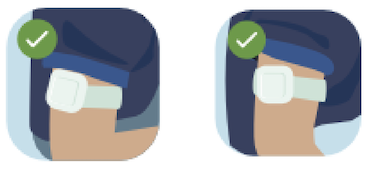
The band sits on the upper arm, sensor against bare skin.
❌ Incorrect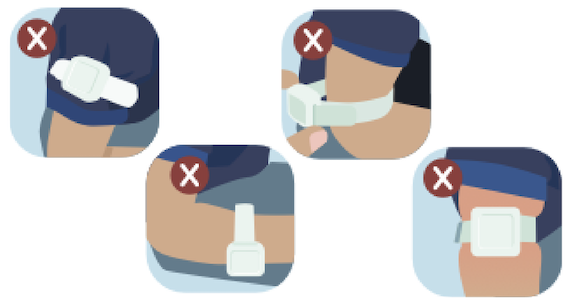
The band should be snug but comfortable — firm enough that it won’t slide down the arm overnight, loose enough that you can still slip a finger underneath. If it leaves a deep mark on the skin, it’s too tight; if it rotates freely, try the next size down.
3Setting up the tablet in the bedroom
The tablet receives data from the band over Bluetooth, so where you put it matters.
| Do | Why it matters |
|---|---|
| Keep the tablet plugged into power all night | The battery will not last until morning on its own. This is the single most common cause of an incomplete night. |
| Keep it in the same room, within 23 feet of your child | Bluetooth range. A closed door or a different room will interrupt the recording. |
| Place it level with the band | Bluetooth reaches sideways far better than it reaches up through a mattress. |
⚠️ Loft bed or bunk bed? Do not put the tablet on the floor underneath. Use a tall dresser or a nightstand so the tablet sits at roughly the same height as your child’s bed.
Once the band is on and the tablet is in place, tap Start Recording on the tablet home screen.
4During the night
Do not stop the recording before morning. Leave the app open, leave the tablet plugged in, and let it run.
- Syncing can take a few minutes at the start. This is normal, especially on the first night while your child settles.
- You do not need to check on the tablet overnight. Our team reviews the data afterwards.
- If your child gets up — for the bathroom, a bad dream, or anything else — simply note it for the morning survey. Don’t stop the recording.
- If your child wakes up and comes to sleep in your bed: simply move the tablet to your bedroom. This keeps the recording going for the rest of the night.
❗ Important
The Gabi System is a data recorder, not a real-time monitor. It does not provide alarms of any kind and is not designed to alert you to anything during the night. If your child appears unwell at any point, seek medical care as you normally would — do not wait for the test results.
5In the morning
- Tap Stop Recording on the tablet.
- Take the band off your child’s arm.
- Put the band on its charger — especially after the second night.
- Fill out the post-night survey (it takes about a minute).
⚠️ Black screen on the second morning? This happens occasionally and is not a problem. Restart the tablet by holding the power button, and mention it in that morning’s survey so our team knows.
6The post-night survey
If a night’s reading shows something unusual — a sudden rise in heart rate, a drop in oxygen levels — the survey is what tells us whether there was a reason for it. Without that context, an explainable event can look like an unexplained one.
Tell us about last night
Each morning, please take 2 minutes to fill in the post-night survey. Your answers help us interpret your child's results more accurately.
Fill in the post-night survey →There are no wrong answers here, and an imperfect night is still a useful night. Tell us what happened and we’ll take it into account.
Worth noting in the survey:
- Your child woke up to use the bathroom, from a nightmare, or for any other reason
- Your child was unwell a cold, a fever, a stuffy nose, a cough
- The band came off or was moved during the night
- The Wi‑Fi dropped out, or the tablet was unplugged or restarted
- Anything unusual about the night: travel, a late bedtime, a different room
7What happens next
After the third night, our team reviews the three recordings to confirm there is enough usable data. If something is missing — a night that cut short, a band that came off — we’ll get in touch to arrange an additional night. Once the data is complete, the results go to your healthcare professional, who will discuss them with you.
⏰ Typical timeline: 2 business days from the end of the third night to results being sent to your provider.
Questions during the three nights?
We’re here to help while the test is running — you don’t need to wait until it’s over. Email us at support.sleeptest@hinlab.com.
Was this article helpful?
That’s Great!
Thank you for your feedback
Sorry! We couldn't be helpful
Thank you for your feedback
Feedback sent
We appreciate your effort and will try to fix the article